
Project Study
Follett Destiny Tree Overhaul
Redesigning a complex resource hierarchy tool to reduce customer friction, hide unnecessary empty directories, improve small-screen usability, and give users more direct control over their organizational structure.
Project Highlights
Overview
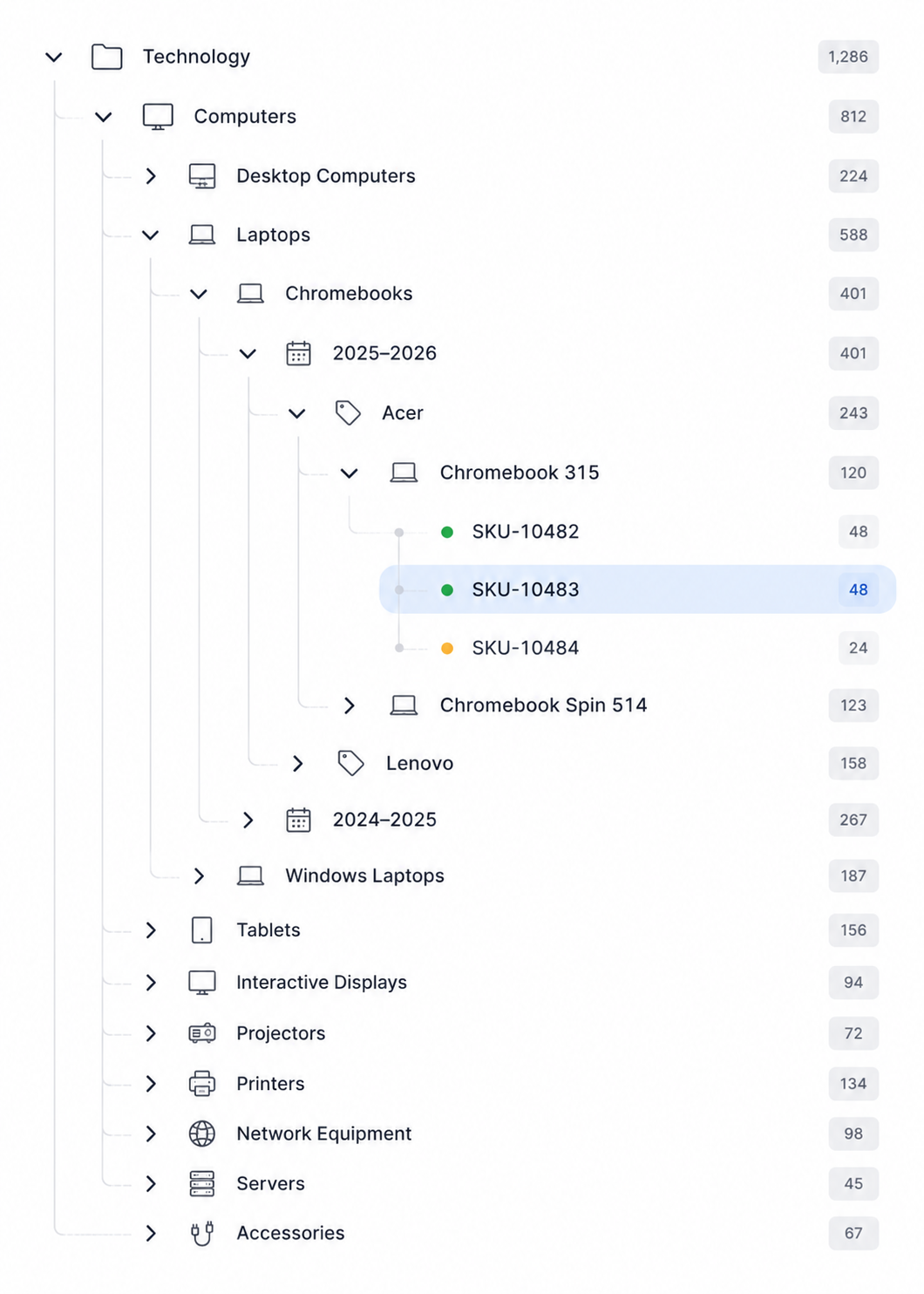
The Follett Destiny Tree Overhaul was a usability improvement effort focused on how customers navigated, edited, and managed large organizational hierarchies within the Destiny ecosystem.
Customers used tree structures to organize resources across locations, departments, devices, categories, and other nested levels of information. In some cases, those hierarchies became extremely deep and difficult to manage.
The redesign focused on making those structures easier to understand, easier to edit, and less visually overwhelming.
Challenge & Opportunity
One of the clearest customer complaints involved empty folders. Users repeatedly asked why empty directories were shown at all, especially when those folders created visual noise and made large trees harder to scan.
The opportunity was to respond directly to that frustration while modernizing the broader experience. The redesign needed to support large hierarchies, small-screen usage, inline editing, drag-and-drop organization, and user control over what appeared in the tree.
The biggest challenge was handling extremely large hierarchies while also gaining access to the right customers for research and validation.
My Contribution
As Senior UX Designer, I helped shape the improved tree experience, focusing on usability, hierarchy management, responsive behavior, and customer-driven workflow improvements.
- Analyzed customer complaints and usability pain points
- Explored improved hierarchy management patterns
- Designed responsive behavior for smaller devices
- Supported truncation patterns for long folder names
- Proposed a toggle allowing users to hide or show empty folders
- Designed inline editing interactions for renaming tree levels
- Supported drag-and-drop movement of groups of data within the hierarchy
Key Design Decision
The customer request was clear: empty folders created unnecessary clutter. Users wanted those folders hidden, or at least wanted the ability to decide whether they should appear.
The toggle became a key design decision. Rather than forcing one behavior on every customer, the design allowed users to control whether empty directories were shown or hidden.
This approach respected different workflows while reducing visual noise for customers who needed a cleaner view of their hierarchy.
Improving Tree Management
The redesign also introduced improvements beyond empty folder visibility.
- Long folder names could be truncated on smaller screens, then expanded when needed
- Users could move entire groups of data using drag-and-drop interactions
- Tree structures could be edited through a more direct WYSIWYG-style interface
- Users could rename hierarchy levels using inline editing tools
- The experience became more manageable for customers with large, deeply nested structures
Outcome
Success was measured through reduced support calls and positive customer feedback.
The redesign addressed a specific, recurring customer frustration while also improving broader usability for large organizational structures.
By giving customers more control over visibility, editing, and hierarchy management, the experience became more flexible and easier to use.
Reflection
This project reinforced the value of listening closely to repeated customer complaints. The request to hide empty folders may have sounded small, but it revealed a larger problem: customers were spending too much energy navigating irrelevant structure.
The most meaningful UX improvements are not always dramatic redesigns. Sometimes they come from removing friction, reducing clutter, and giving users control over the information they need to manage.
Good UX often starts by listening carefully to the small frustrations users repeat over and over again.
Interested in working together?
Whether you’re building a digital product, evolving a brand, or tackling a complex user experience challenge, I’d love to hear about it.
Get in Touch